
Combine vs. split: why your map is shaped the way it is
If you map more than one service, you will notice that some workflows serve several services at once while others exist for a single service alone. That shape is not an accident. It is the most consequential set of decisions in your Workflow Map, and this article explains how those decisions are made.
The decision, phase by phase
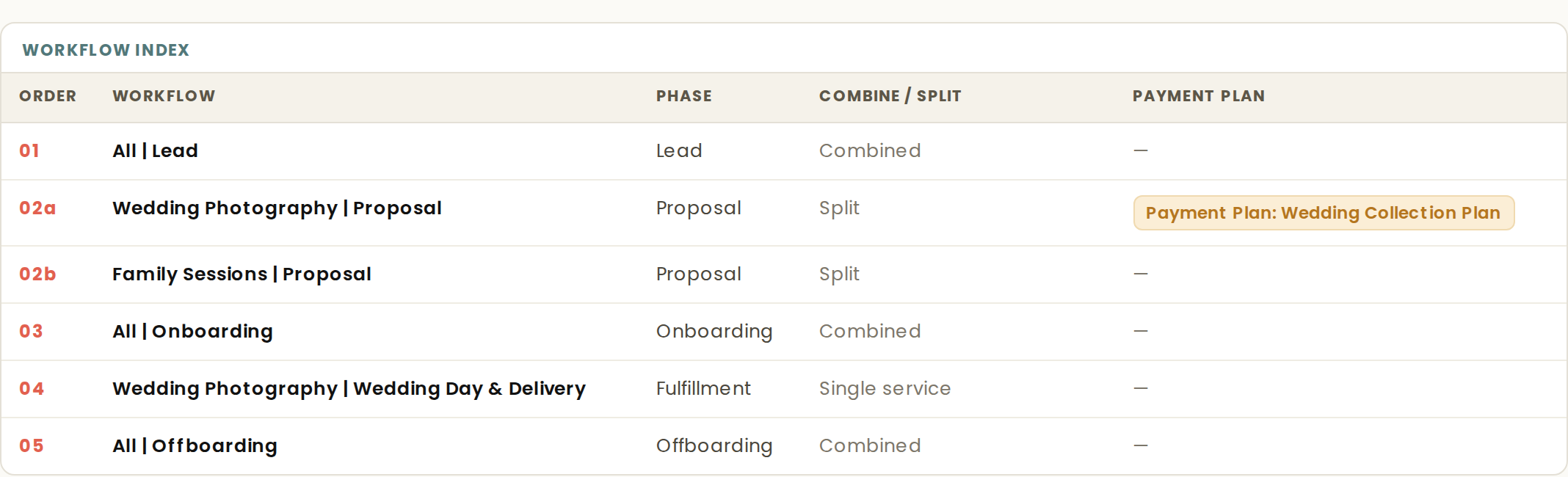
For every phase of the client journey, the plan decides whether your services share one workflow or each need their own. The decision is stated in the map, not hidden: the Workflow Index carries a Combine/Split column, so you can see exactly what was decided and where.
When services combine
Phases where services genuinely run the same way combine into one shared workflow. If your inquiry process is identical no matter which service a lead asks about, one inquiry workflow serves them all.
The benefit is maintenance. One workflow means one place to update when something changes, instead of a set of near-duplicates that drift apart over time. A map that combines where combining is structurally sound is a map you can actually keep current.
When services split
Phases that carry service-specific content split into their own workflows. The clearest example is proposals: proposals split by default, because a proposal carries each service's own packages and pricing. Sending a shared proposal workflow would mean sending the wrong packages to someone, so each service gets its own.
The standard is content, not choreography
Here is the part that surprises people. Matching step sequences alone are never enough to combine. Two services might both follow the pattern of send email, then send form, then set status, and still need separate workflows, because the emails and forms themselves differ.
The content has to be shared, not just the sequence. A workflow is not a list of step types. It is the actual emails, forms, and triggers those steps carry. Combining on choreography alone would quietly merge content that should stay distinct.
If you disagree
The Combine/Split column exists so you can audit these decisions, not just accept them. You know your business, and there may be context the intake did not capture.
If a decision does not fit how you work, a revision can combine or split workflows. State what you want joined or separated, and the map is rebuilt around your ruling.